Sunday, February 16, 2014

E-readers & Tablets

Interested in downloading e-books?
Want to learn more about e-readers and tablets?


Nexus 7
Nook Simple Touch


Check-out an e-reader or tablet today! This semester, three ACC Libraries -- CYP, RGC, RVS -- have a limited number of Nook e-readers and Google Nexus tablets available for checkout as part of a pilot project!

You'll be able to download e-books, apps, and more!  Contact a participating library for more information.  Devices are available for a 2-week check-out on a first-come, first-served basis.

Questions? Call: 
  • CYP Library 512-223-2037
  • RGC Library 512-223-3068
  • RVS Library 512-223-6005

Q & A's.... (also see the E-Reader/Tablet Pilot Information Guide for more details).

What is an e-reader/tablet?
An e-reader is a portable device used to read electronic versions of books (e-books). A tablet is a mobile computing device that works with applications that can be downloaded to the device.
What type of e-reader/tablet is available at Austin Community College libraries?
The Cypress Creek, Rio Grande, and Riverside Libraries have a limited number of Nook Simple Touch e-readers as well as Google Nexus tablets.
How do I reserve an e-reader/tablet?
E-readers and tablets are available on a first come-first serve basis.
How will I know when the e-reader/tablet is available?
You can check the ACC Library Catalog for availability status.
How long can I keep an e-reader/tablet?
E-readers and tablets can be checked out for two weeks with no renewals.
Where do I pick-up/return the e-reader?
The e-reader or tablet must be checked out from and returned to the same library. Participating libraries include the Cypress Creek, Rio Grande, and Riverside Libraries.
What happens if the e-reader is damaged or lost?
Library staff will determine the extent of the damage and will assess repair/replacement costs as well as any other fees. 
What can I read on the e-readers/tablets?
Both e-readers and tablets can be used to read e-books, e-textbooks, as well as magazines and other digitized media.
How do I use the e-readers/tablets?
Instructions are available on how to download e-books and get started with both the e-reader and tablet. 
What if the battery runs down while I have the e-reader/tablet checked out?
Both a wall plug and USB cable are provided at check-out to ensure that the device can be charged if needed.
Can I load my own e-books on the e-reader/tablet?
Yes, you are welcome to load your own e-books on either the e-reader or tablet.
Can I read the library’s e-books on my own personal device?
Yes, you can download and read ACC Library e-books on your own e-reader/tablet. Some devices may not be compatible.
Where do I find more information on using an e-reader/tablet?
The E-reader/Tablet Pilot Information Guide is your best source of information on using our e-readers and tablets. Library reference staffs at the Cypress Creek, Rio Grande, and Riverside Libraries are also available to assist you with the devices.

Monday, February 3, 2014

Need Stats?

Writing an argument or a persuasive paper?  Need “the numbers” for an item reported on the evening news?  Numbers and statistics are powerful pieces of evidence.  They are strong visuals that can strengthen an argument if they are from reliable sources and if they are used correctly.

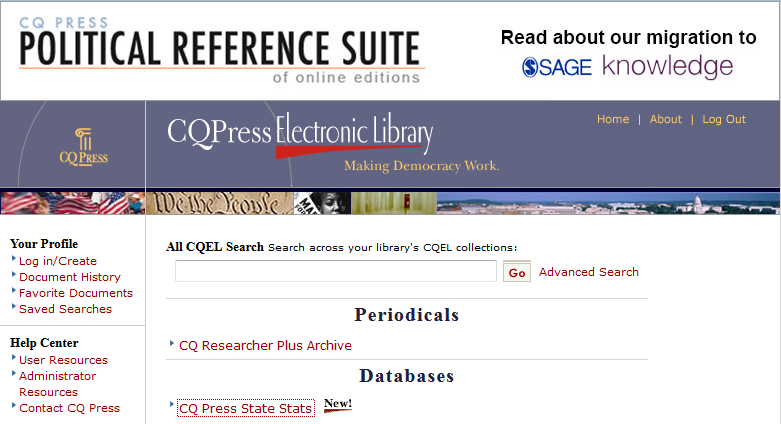
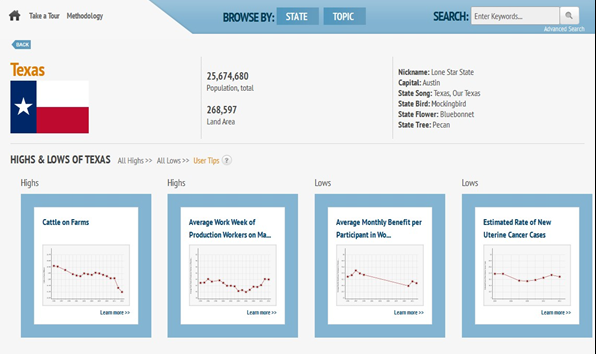
State Stats is a database from CQ Press that provides comprehensive data coverage of each state in several subject areas. You will find more than 15 years of data from more than 80 different sources.
Search the library catalog for State Stats, then click on the resource link to open the database.  If searching off campus, you will need to enter your ACCeID and password to get to the database.


Information in State Stats has been published in print volumes, such as State Rankings books, or taken from private or government online sources, such as U.S. Census Bureau databases like American FactFinder.


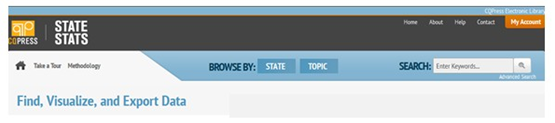
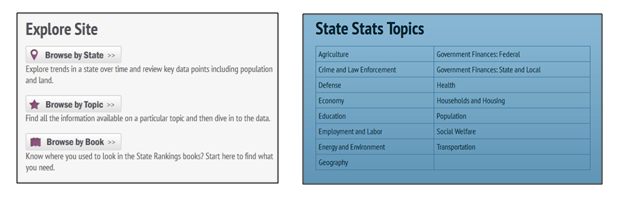
Like most databases, State Stats offers both general and advanced search features. You can also browse by state, by topic, or by State Rankings books. Browsing by topic is a useful way to explore the database. You can refine your results after searching or browsing.

Information will first be presented as a map. Each state will be shaded according to its rank for whatever topic you have chosen. While there is no key to indicate what various the shades mean, you can mouse over each state to view a pop-up description. A time line at the bottom of the image lets you zoom through multiple years of statistics. Press the "Play" button to animate your data. Many graphics can be animated to show changes over a period of time from 1995 to 2010 or later.

Comparing data
 
When you find data that interests you, explore it! Use the power of the database to compare multiple sets, add multiple states, data series, and years, and use the mapping and graphing tools. You can create a trend line chart of up to 6 states for any data series.  Compare any two data series to see if there is a correlation. On the Compare tab, choose Data Series and then use the drop down list to select the data series you would like to compare to the one you are viewing.


Creating Output
 
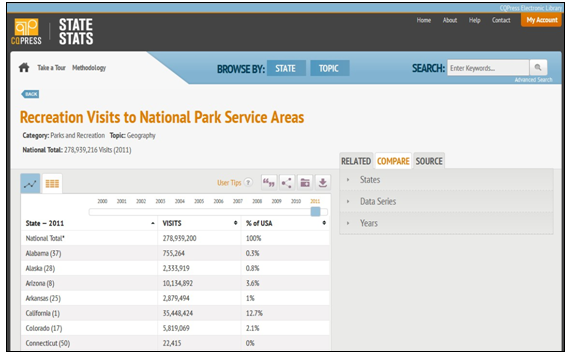
You can display results as a map (state view), table, scatter plot, or line chart. View any data series as a table by selecting the second tab just below the data series title. You can scroll through all available years on the table view page and sort data alphabetically or numerically.


Download your data to use it in reports

To export data, go to the data series page and choose the export option above the panel. All results can be shared by e-mail or hyperlink, saved, or exported as PNG, JPEG, CSV, or Excel files. Exported data files in Excel format will include the date of download, descriptions of the data, and, most importantly, original source information.

Maps and graphs can be downloaded as PNG files, which will look exactly like the screen image.


Citing

State Stats features CQ Press’s CiteNow!® function for generating source citations in APA, MLA, Chicago (Turabian), and other styles.

Take a tour

View the video tour of State Stats to see its features in use.


Sunday, January 19, 2014

ACC Library Supports Classroom Faculty With Instruction Opportunities

The Library Services Information Literacy (IL) Team offers an online request form to streamline the process for requesting library instruction that supports the learning outcomes YOU have identified for your students.To request that an instruction session be scheduled for your class, complete the Library Instruction Request Form.


With two weeks notice, a librarian on your campus can work with you to plan an instruction session covering the student learning outcomes (SLOs) you specify, and can join your class for hands-on instruction with your students. Librarians can also work with you to assign our new, engaging, assessment-embedded tutorials to create a flipped classroom.

Have questions about this service or need help with the Library Instruction Request Form? Contact one of the IL Team members for more information:
  • Terry Barksdale, tbarksda at austincc.edu
  • Ashley Carr, acarr at austincc.edu
  • Courtney Mlinar, courtney.mlinar at austincc.edu
  • Dave Wilson, dwilson3 at austincc.edu 

Sunday, November 24, 2013

New Bite-Sized Online Tutorials


Library Services is creating a series of interactive tutorials designed to help students make sense of the research process. Of course, we already offer many resources to help students develop information literacy skills--from Library Guides to face-to-face classroom instruction. What’s new here?

In the new series, we’re focusing on bite-sized lessons. We’re breaking down the research process and the wealth of resources we offer into short, hands-on tutorials designed to teach a single concept so students and faculty can zero in on a particular skill that needs attention right now.  

http://acclsknowhow.articulate-online.com/9250375325 


By selecting from the series a la carte, faculty can assign students to tackle any combination of skills in whichever order makes the most sense pedagogically. Since we’re adding them to our Online Tutorials page, anyone can drop by 24/7 to find a few helpful starting places.


If as a faculty member, you’ve noticed that your students have difficulty selecting a topic for an upcoming research paper, you might assign your students to complete our new Choosing a Topic module. This engaging and interactive tutorial will help them get a handle on broadening and narrowing their topic ideas. In addition, we introduce basic strategies, with engaging examples and illustrations, and let them practice what they’re learning on the spot. Our tutorials come packed with fun activities like drag-and-drop activities that immediately allow students to apply a concept they’ve just explored to a relevant, real-world scenario.


http://acclsknowhow.articulate-online.com/9250325935


Finally, each tutorial includes a brief multiple-choice quiz that provides immediate feedback. Need a way to see how they’re doing so far with a new concept? Students can print off their quiz results and turn them in.


These tutorials offer flexibility to faculty to choose how to incorporate these engaging new tutorials into your classes and assignments. They can be discussion-starters, first steps before hands-on classroom time with a librarian, assignment supplements that can be threaded through any research-related writing assignment, or used to introduced a flipped classroom-session. Consult with a librarian at your campus to explore the possibilities!


For now, we hope you’ll explore our first three modules, and let us know what you think:


We’ll keep adding new modules as we complete them, so please watch for updates. Look for the entire suite in Fall 2014.

Sunday, November 10, 2013

Library Group Study Rooms


ACC Faculty often assign group projects to their classes but sometimes, students then have difficulties finding a location to work together in a ‘clean, well lighted place’, with technology available to support your learning.

These ACC libraries have group study rooms available for currently enrolled ACC students studying together:
CYP, EGN, EVC, NRG, RGC, RRC, RVS, and SAC.
(At this time, the PIN library is the exception.) 

Opening in January 2014, the new Hays Campus (HYS) Library will also have one group study room.

To sign up to use a room, come to a library’s Reference Desk in person and show the librarian your ACC ID card. Slots are available from 30 minutes to 2 hours, and depending on availability, at the end of your reservation you may be able to extend the time. 

Reservations are accepted up to 7 days in advance, but be sure to arrive punctually -- if you’re more than 10 minutes late, your group forfeits the reservation! 

Use the white board or check out laptops at a Library’s Circulation Desk so group members can collaborate via Google docs, view media, review Blackboard materials, print documents, etc.  In a few study rooms you can connect your laptop to a projector or flat screen for group viewing!

The study rooms may not be used for tutoring, meetings of organizations, or for faculty to meet with students. ‘Group study’ means just that – 2 or more currently enrolled ACC students – these are not ‘individual study rooms’. Please see complete rules   about the study rooms. 

Sign-up, meet your group, and be successful with that project or ace that test! Would you like more info? Need other locations to study on your campus? Are you stuck getting started researching your topic?  Ask a librarian! We’re here to help you.


Sunday, October 27, 2013

Business Resources in Unexpected Places

Sometimes resources useful for businesses are not in the traditional places or may not have the word "business" in their title.  Here are some other places to consider when you're looking for solutions and ideas:

Considering a hobby or craft-related business?
Hobbies & Crafts Reference Center provides practical articles, books, and videos on how to succeed in a wide range of hobbies and crafts businesses.  There are even some tips on being more environmentally friendly in your home business.

Working from home or in a real estate-related business?
Home Improvement Reference Center helps with articles and books on creating your home office, home staging that works for selling homes, property maintenance and repair, energy and sustainable environment upgrading, renovating, becoming a qualified remodeler, and more--complete with detailed instructions. 

Have a business that uses outdoor power equipment, water crafts or boats, tractors, motorcycles, generators, other small engines?
Small Engine Repair Reference Center has an impressive collection of service manuals to meet your needs.

Want to explore business in Texas?
Texas Reference Center can easily be searched by business or business topics to locate articles from magazines and newspapers (including small local ones) and chapters from books like the Texas Almanac.
  
You or your staff need to upgrade your Excel skills, especially in financial analysis, advanced data analysis, using text functions, advanced pivot table features?
LearningExpress has self-paced tutorials for several versions of Excel.  The 2010 version goes beyond Advanced to Expert level.  (See more in the Learning Express Spotlight from July 15, 2013 and the Subject Guides mentioned at the end of this Spotlight.)

Want to work effectively in our diverse workplace?
Guide to Culturally Competent Health Care [electronic resource], 2d ed. has a WORKFORCE ISSUES section for each of several dozen ethnic groups.

See more business resources on our Management Subject Guide  (or the Subject Guides for International Business, Financial Management, and Real Estate).  Or Ask a Librarian!

Monday, October 14, 2013

Christopher Columbus

In the United States, Columbus Day is celebrated on the second Monday in October.  This year it will fall on October 14, just two days away from October 12, the day on which Columbus went ashore on the island of San Salvador in 1492 ("Columbus Day" 118-119).  Saying that Christopher Columbus's discovery of the Americas (or rediscovery, considering the earlier Viking settlement in Newfoundland ("The Vikings")) brought many changes to the world is, if anything, an understatement.  Historians even have a term for the Americas before Columbus, "Pre-Columbian."

Historian Alfred Crosby noted many of the changes as a result of Columbus's voyage to the new world in his book The Columbian Exchange: Biological and Cultural Consequences of 1492, from which we get the term "Columbian exchange."  Once revered, Columbus is now seen more critically by some for the many evils that Europeans brought to Native Americans after his discovery.  Whether or not Columbus himself should be blamed for these evils is up for debate ("Who Owns History").

At any rate, the Columbian exchange did bring many benefits, such as new foods.  Indeed, where would fast food be today without the potato and tomato from the Americas--the basic ingredients for French fries and ketchup (Crosby 170)?  But in all seriousness, crops such as the potato have had enormous consequences for both European and United States history.

Food, in fact, played an important role in Columbus's voyage.  Europe relished spices from the East.  However, with the collapse of the Mongol empire and the Ottoman capture of Constantinople in 1453, trade over land between Europe and the East became much more tenuous (Phillips, Jr. and Phillips 47, 49-51).  This helped motivate Europeans to find sea routes to India and the Orient--to Marco Polo's islands of spices and gold (Hale 59).  The Portuguese sailed around Africa to get to India.  Columbus proposed sailing westward to reach the East ("Discovery of a New World").

Why would anyone back Columbus's venture?  Wouldn't they worry that he would fall off the edge of the world?  Actually, contrary to popular legend, contemporaries of Columbus were quite confident that the world was "round," not flat.  Indeed, in his book Inventing the Flat Earth, historian Jeffrey Burton Russell refers to this recent myth, which once inhabited many textbooks, as "The Flat Error" (Russell 1-4).

Nevertheless, long ocean voyages could be quite perilous.  Despite Columbus's underestimate of the earth's size, his expedition still promised to be lengthy.  At that time, mariners did not have a reliable way of determining their longitude, and even latitude could be difficult to discern.  Thus Columbus's sailors were justified in their fear that they might become lost at sea, that their ship might be destroyed in a storm, or even that they would run out of fresh water before reaching land (Morison 184, 191).  So, although falling off the edge of the earth was not a concern, Columbus's voyage could still be considered a quite courageous undertaking.

As we can see, a study of Christopher Columbus is multifaceted, which illustrates one of the many values of ACC's libraries:  they provide resources for studying many aspects of a particular subject, not just one--in this case, historiography, astronomy and navigation, and geography, just to name a few.  Here, then, are some of the many resources that ACC's libraries have about Christopher Columbus and related topics:


Circulating Materials (May Check Out)

Admiral of the Ocean Sea
Age of Exploration
Celestial Navigation
Christopher Columbus: Explorer of the New World (DVD)
The Columbian Exchange
Inventing the Flat Earth
Longitude
People and the Sky: Our Ancestors and the Cosmos
The Worlds of Christopher Columbus
When Worlds Collide: The Untold Story of the Americas After Columbus (DVD)


Online Sources  (You may need to log in if off campus) 

Astronomy Subject Guide from the ACC Libraries
"Columbus Day" -- Article in Holidays, Festivals, and Celebrations of the World Dictionary
"Columbus Day" -- Article in Holiday Symbols and Customs
Geography Subject Guide from the ACC Libraries
"Marine Navigation" --Article in AccessScience
"Terrestrial Coordinate System" --Article in AccessScience
World History Subject Guide from the ACC Libraries

Streaming Videos from Films on Demand

1421: The Year China Discovered America? 
Discovery of a New World
Latitude and Longitude: A Global Address 
The Vikings
Who Owns History?
Wind


Works Cited

"Columbus Day." Holidays, Festivals, and Celebrations of the World Dictionary. 

          Ed. Helene Henderson. 3rd ed. Detroit: Omnigraphics, 2005. 118-119.

          Gale Virtual Reference Library. Web. 10 Oct. 2013.

Crosby, Jr., Alfred.  The Columbian Exchange.  Westport, Connecticut: Praeger, 2003.

          Print.

"Discovery of a New World." Films On Demand. Films Media Group, 2004.

          Web. 8 Oct. 2013.

Hale, John R.  Age of Exploration.  New York: Time, 1966. Print.

Morison, Samuel Eliot.  Admiral of the Ocean Sea.  Boston: Little, Brown and Co., 1942.

Phillips, Jr., William D. and Carla R. Phillips.  The Worlds of Christopher Columbus.

          New York: Cambridge University Press, 1992. Print.

Russell, Jeffrey B.  Inventing the Flat Earth.  Westport, Connecticut: Praeger, 1997. Print.

"The Vikings." Films On Demand. Films Media Group, 2000. Web. 8 Oct. 2013. 

"Who Owns History?" Films On Demand. Films Media Group, 1994. Web. 9 Oct. 2013.