Monday, February 1, 2016

Library Group Study Rooms


ACC Faculty often assign group projects to their classes but sometimes, students have difficulties finding a location to work together in a 'clean, well lighted place', with technology available to support your learning.

Locations: These ACC libraries have group study rooms available for currently enrolled ACC students studying together: Cypress (CYP), Elgin (EGN), Eastview (EVC), Hays (HYS), Northridge (NRG), Rio Grande (RGC), Round Rock (RRC), Riverside (RVS), and South Austin (SAC). At this time, the Pinnacle (PIN) library does not have a group study room.  Highland Campus (HLC) has lovely group study rooms, but they are located in the ACCelerator (across from the Library). Show your ACC ID and ask about availability at the ACCelerator's service desk.

For Library Group Study Rooms: Come to a library's Reference Desk in person and show the librarian your ACC ID card. If you are at one campus but need to make a reservation at another, take your ID to the Reference Desk and request the librarian call the Reference Desk at the second campus to arrange the reservation.
  • Slots are available from 30 minutes to 2 hours, and depending on availability, at the end of your reservation you may be able to extend the time.
  • Reservations are accepted up to 7 days in advance, but be sure to arrive punctually -- if you're more than 10 minutes late, your group forfeits the reservation!
  • Use the white board or check out laptops at a Library's Circulation Desk so group members can collaborate via Google docs, view media, review Blackboard materials, print documents, etc. In a few study rooms you can connect a laptop to a projector or flat screen for added convenience!

Rules: 'Group study' means just that - 2 or more currently enrolled ACC students - these are not individual study rooms. The study rooms may not be used for tutoring, meetings of organizations, or for faculty to meet with students. Please see complete rules about the study rooms.

Sign-up, meet your group, and be successful with that project or ace that test! Would you like more info? Need other locations to study on your campus? Are you stuck getting started researching your topic? Ask a librarian! We're here to help you!

Tuesday, January 19, 2016

New to Austin Community College? Checkout the ACC Libraries Student Learning Success Toolbox-

Student Learning Success Toolbox

Start Here-Get There!

New to Austin Community College? 

Checkout the ACC Libraries Student Learning Success Toolbox- complete with all you need for getting started. Available 24/7 from the ACC Library home page, this Toolbox is packed with great tools and links to help you get started this semester.

Answer frequently asked questions such as:


  • How do I manage my job, kids and my courses at ACC? 
  • How do I learn how to research the way the professor said in class?
  • How do I find peer-reviewed journals?
  • Where can I get help for one of my assignments?


  • Did your professor ask you to pick a topic for a paper? Try our short tutorial Choosing a Topic and learn how to choose the best topic for your assignment.

    Are you tempted to consult Wikipedia about an unfamiliar topic? Try our short tutorial Finding Background Information and learn how you can get started on your assignment.

    Need more assistance? Ask a research expert- any librarian at Austin Community College! You can walk into any campus library to get help, call or email us. We even offer help after hours - chat 24/7!

    Don't be shy- we love to help students with your questions! Come by and see us today!

    Monday, December 14, 2015

    Confused about Textbooks !


    image of textbooks
    The Library does not purchase textbooks as a rule.
    So why can we check out textbooks from the Library?

    Although the Library does not purchase textbooks for all ACC campus libraries, we do shelve the ACC Student Support Center Textbook Collection at the Highland Campus Library.  
    What is it?  It is a collection of textbooks selected for classes offered in workforce programs. These textbooks are purchased by the ACC Student Support Center through a grant to assist certain student groups to gain access to required textbooks. The majority of ACC textbooks ARE NOT in this collection.  Books are in limited supply and students should not depend upon this source for their required textbook.
    Who can check the textbooks out?  Most students are not eligible to check out textbooks from this collection BEFORE the second week of classes. Visit with staff in a Student Support Center BEFORE the semester begins to determine your eligibility. Eligible students will receive information and required forms to begin the process.
    Where do you go to check out a textbook?  AVOID LONG LINES -- Beginning the second week of classes, you can go to any ACC library and ask that an available textbook be sent to you at that campus for checkout.  See the list of available textbooks.
    What is the Student Support Center?
    ACC's Student Support Center provides specialized assistance and referrals to a select group of students who would benefit from additional assistance to overcome challenges and complete their education.The Support Center maintains a collection of textbooks for students to borrow and gives priority to students receiving assistance. Other students may request a loan after the first week of classes.

    Sunday, November 22, 2015

    Streaming Films - Kanopy

    Welcome to Kanopy, start watching now!


    Go to the Library's A-Z list of databases and click on K for Kanopy:


    If you are off campus, you will be asked for your ACC eID and password. (Depending on your computer's settings, you may need to accept the site's certificate.)

    ...start watching!


    These are just a few of the many subjects


    Film,  The Arts,  Business,   Education (K-12)  Global Studies & Languages,  Health, Media & Communications,  Sciences,   Social Sciences,  Technical Training


    Read Kanopy's Blog Posts


    Sunday, November 8, 2015

    Makerspaces @ ACC Libraries: Welcome to the BatLab

    The popularity of the maker movement can be attributed to the 2005 launch of Make: magazine. A publication which encourages its readers to create. Shortly after the magazine's inception they began offering Maker Faires throughout the country, thus spearheading the worldwide maker movement. In 2015, the maker movement is still strong. Communities of makers are connecting, tinkering, innovating, and learning in makerspaces worldwide. A makerspace is loosely defined as a space which provides individuals the opportunity to create, collaborate, learn, and explore. While they are not solely defined by their tools or equipment, a typical makerspace may include: 3D printers, digital media and production, electronics, robotics, tools for welding or soldering, and traditional arts and crafts materials.

    In recent years academic libraries have embraced the maker movement by allocating space, staff, resources, and programs to provide a makerspace (or maker activities) within the library. John Burke, Library Director at Miami University Middletown, recently shared his survey results on academic libraries and makerspaces at the 2015 Association of College and Research Libraries Conference. Burke suggests that makerspaces in academic libraries promote an atmosphere beyond the classroom where students (regardless of discipline or major) can experiment and learn. His full report is available here: Making Sense: Can Makerspaces Work in Academic LibrariesMakerspaces in academic libraries allow students to explore, learn, and create through participation in active learning, critical thinking, peer learning, and exposure to cutting edge technologies. The joining of makerspaces in libraries promotes equitable access to resources and technologies that a user may not otherwise have access to. This is also a core function of libraries.

    This fall ACC Libraries is launching a pop-up makerspace concept coined the BatLab. The BatLab is a space which encourages: hands-on learning, student success and engagement, experiential learning, STEAM based learning activities, exploring, tinkering, creating, sharing, peer learning, co-curricular collaboration, and a no fear of failure attitude. The BatLab is open to current ACC students, faculty, and staff.
    BatLab Attendees learning Arduino

    The Library's approach is different from other ACC academic departmental maker-like-spaces and many traditional makerspaces in that it is not held in a dedicated space. In addition the Library will also be providing kits and materials for the ACC community to checkout, take home, and create. BatLab activities are also learning experiences with learning outcomes!

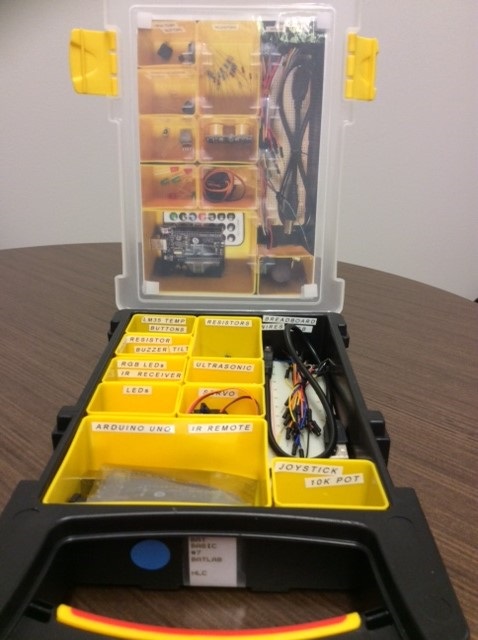
    The Highland (HLC) Library and the Northridge (NRG) Library will serve as home base for many of the pop-up BatLab activities -- meet-ups, demo days, tech petting zoos and workshops. HLC Library will also serve as the central point for circulating the electronics and microcontrollers such as Arduino, Raspberry Pi, and Internet of Things - Photon kits.

    To learn more about the BatLab or connect with fellow makers, stop by a Maker MeetUp at the HLC Library on Friday's from 9 am - 12 pm. To follow the project and see its progress visit the online BatLab Makerspace Library Guide which includes links to resources, projects, kit information, and a calendar of upcoming events. Browse the Library's collection of books and ebooks on makerspaces and the maker movement, Arduino, 3D Printing, Raspberry Pi and more!


    ACC Libraries BatLab Basic Project Kit (Arduino)

    Available Soon @ A Library Near You!


    Sunday, October 25, 2015

    JSTOR

    JSTOR's logo. JSTOR stands for "Journal Storage."
    Want to impress your professor by using scholarly sources for your paper or project? Including articles from the JSTOR database in your research could do just that!

    JSTOR indexes thousands of scholarly publications, especially in the humanities, social sciences, and life sciences. JSTOR also provides millions of pages of full-text, including primary source documents and books as well as journal articles, some written well over a century ago.*

    Are you still trying to decide the specific topic for your paper or report? By searching a general topic in JSTOR, you are likely to discover all sorts of more specific topics that you can pursue.

    For example, suppose the anniversary of the Battle of Agincourt has just passed (it was fought on October 25, 1415) and you decide to write about Shakespeare's play Henry V, which features the English king's surprising victory over the French. But what exactly about this play would you write? JSTOR includes so many different takes on Henry V, it might be difficult to choose!**

    Suppose you have an assignment to write a book review. JSTOR has thousands of book reviews to serve as models for writing one. In fact, JSTOR has a box that you can check to limit search results just to reviews (illustrated in the example below)!

    This search filter can come in handy for other types of reviews as well. For example, perhaps for a paper on a play the information sources required by your professor include a review of an actual performance of that play. JSTOR is very likely to have reviews of several different productions of the play (as long as it debuted more than five years ago).*

    Searching JSTOR:

    From the library home page at library.austincc.edu, find the FOR STUDENTS menu on the left.  There, click on A-Z List of Databases.

    1.  At the Alphabetical list of database titles, click on the J.
    2.  Click on the JSTOR link. (If off campus, you will then need to log in.)
    3.  Below the search box that appears, click on the Advanced Search link.

    This search finds reviews of the book The Puritan Dilemma by noted historian Edmund S. Morgan.                                        


    4.  Enter search terms in the search boxes that appear.
    5.  From the drop down menu to the right of each search box, select the field in which each search term will be searched.  The default field, “Full-Text,” often yields useful search results.
    6.  To add search boxes, click on the ADD FIELD + button below the last search box.
    7.  Narrow by item types, such as articles, by clicking on the appropriate check boxes.
    8.  Narrowing the search further by date, language, etc. is usually unnecessary.  When you are ready to execute your search, click on the Search button.

    For more information on searching JSTOR, please feel free to consult with an ACC librarian. JSTOR also offers excellent guidance. JSTOR's tutorials include basic and advanced searching techniques, sorting and reviewing search results, and using JSTOR on a mobile device. Have fun exploring the wealth of scholarly resources JSTOR offers!


    Notes:

    * Full-text coverage in JSTOR varies from publication to publication.  For most periodicals, an embargo on the most recent five years of articles is in effect.  That is, JSTOR often indexes a periodical up to the present without providing full-text to the periodical’s most recent five years of articles. For more recent articles, you may wish to search some of the other great databases that ACC's libraries provide.
                           Is this a rabbit, or a duck?

    ** Some articles that JSTOR has indexed are seminal works in a particular scholarly area of interest, such as Norman Rabkin's highly influential "Rabbits, Ducks, and Henry V," which discusses Shakespeare's ambiguous portrayal of the English king.


    Sunday, October 11, 2015

    Checkout Student Success at ACC Libraries


    Checkout Student Success at ACC Libraries:


    Explore ACC Libraries videos:

    Help-O-Matic


    Top 5 Library Website Tips: ACC Libraries


    Explore ACC Libraries Research Guides:

    Class Guide: EDUC 1300


    Student Learning Success Toolbox